![kb_logo_white.png]](https://kb.cybertecsecurity.com/hs-fs/hubfs/kb_logo_white.png?height=40&name=kb_logo_white.png)
IASME provides a knowledge hub where they discuss mobile devices, specifically BYOD, which is also the normal method of mobile device use we see when testing today.
IASME states in their Knowledgebase Hub: It's important to note that an organisation cannot use a written policy to substitute for applying controls to a BYOD device; technical measures also need to be in place.
The NCSC produce a document called "Requirements for Infrastructure" which are the controls and systems required for Cyber Essentials; which, details the requirements for mobile device management.
Our article here is based on V3.3 of the document, effective April 2026; however, the overall requirements were the same in V3.2.
It is fair to say you should have Mobile Device Management (MDM) or Mobile Application Management (MAM) in place; however, if you have only a few devices, our assessors will manually check them.
SECTION2:

SECTION 3:
SECTION 4:
SECTION 5:

SCOPE:
Mobiles are in scope if used for anything other than:
-
native voice applications
-
native text applications
-
multi-factor authentication (MFA) applications are out of scope.
BYOD and “Included device scope”
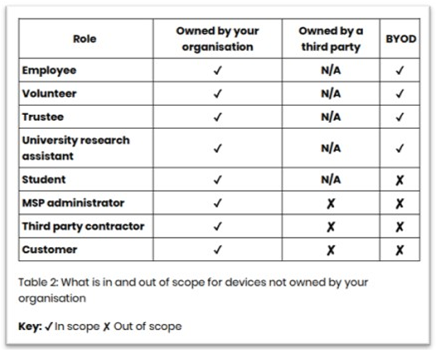
Assessors are tasked to ensure the above are delivered across those we assess, and, that in larger estates, (more than a handful of devices) technical controls are in place and reviewed, as we know from experience, that the lack of technical controls even in smaller organisations means we will find unsupported OS in use.
(You can check your estate of unmanaged devices by creating a filter in Tenant Admin (Intune), Managed App Filter, Manufacturer starts with Apple, OS starts with 26, hit preview, you should be seeing 26.2.1 or 26.3 (26.3 required by 25th Feb, as an example), anything else is a good example of the issue, only IOS 26.3 / 18.7.4 and 16.7.13 are supported IOS 17 is not supported for mobiles).
NOTE: The above Technical Guidance key points around BYOD, where specifically for mobiles is:
- The Operating System and apps must be fully supported by the manufacturer and receive security updates
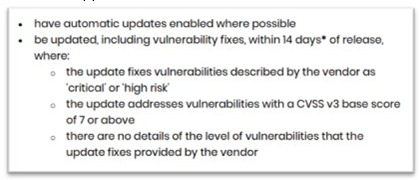
- Security updates must be installed within 14 days
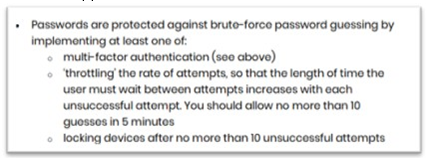
- Cyber Essentials password controls are applied to users own devices (BYODs)
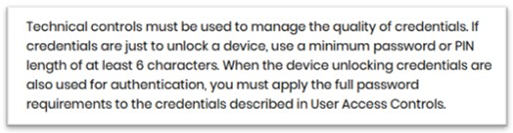
- The device automatically locks when not in use and requires a 6 digit or more pin/pass code to unlock, (use a biometric if available)
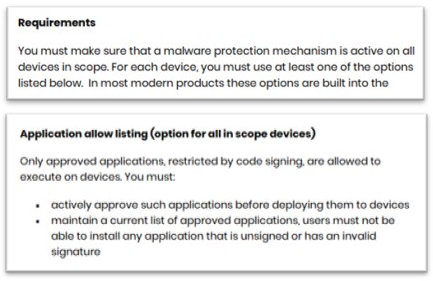
- For a mobile device, only apps from the manufacture’s respective store are allowed to be installed
- Unused apps should be uninstalled
- If lost or stolen, it must be reported to the business promptly
- Rooting or jailbreaking is not permitted
- A remote erase and tracking app must be installed and activated so you can track a lost device, lock access and erase data.
- Obtain written consent in advance from the device owner to remote wipe the device in the event of loss, theft or termination of employment
- Clarify how, when, and why monitoring will take place and require the device and passwords to be delivered up on reasonable request